


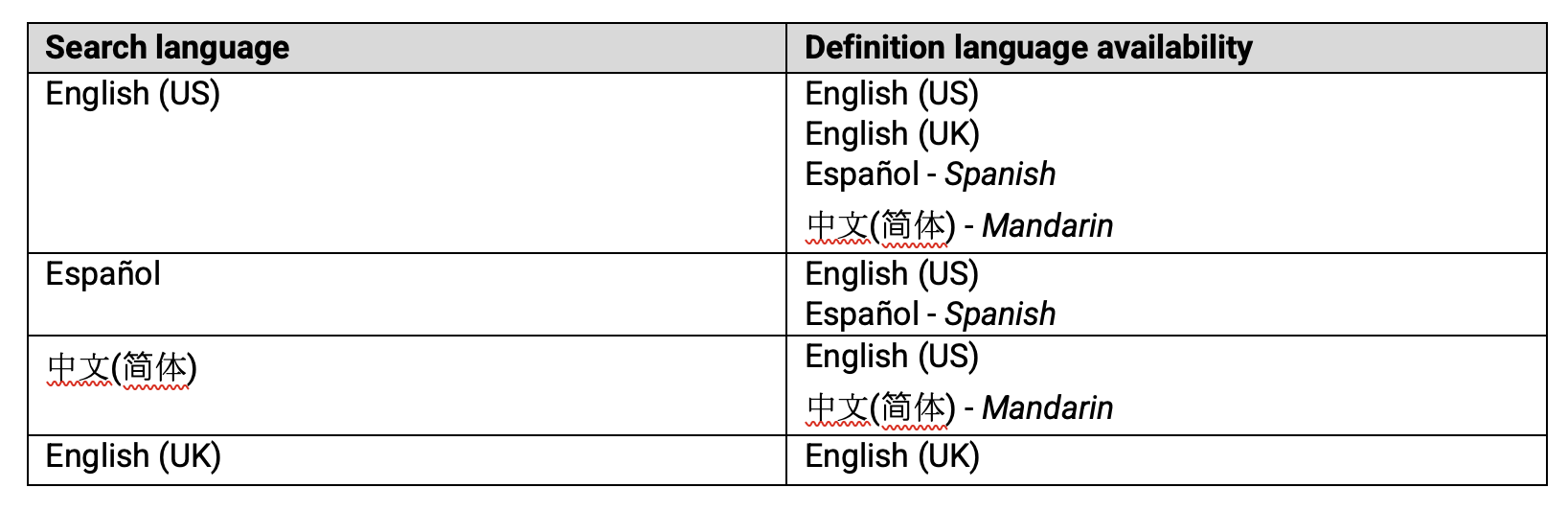
At Renaissance, we know that every student brings a unique language journey to the classroom. That’s why we’re excited to share the latest enhancement to myON: a multilanguage dictionary that now supports American English, British English, Spanish, and Mandarin. Students and educators can now switch between these languages to instantly translate a word and view the definition of the translated word, all within the myON reading experience.
The multilingual dictionary is just a click away. Select the dictionary icon in the right navigation while reading. The book’s language is automatically detected and defaults to that for searches, with English (US) as the fallback if language isn’t detected.
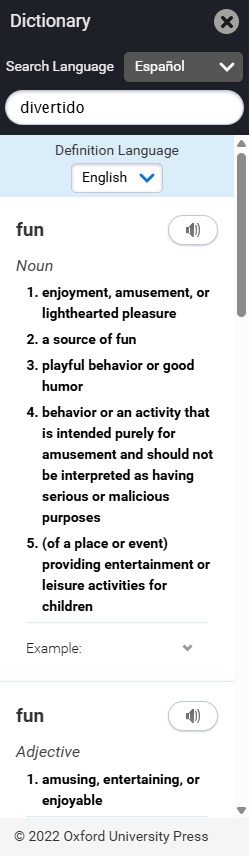
Languages can be changed at any time to view definitions and translations, as follows:
The multi-language dictionary is designed to remove friction and encourage curiosity. It’s one more way myON adapts to each student, wherever they are on their reading journey.
myON as a dynamic reading practice tool
As part of Renaissance’s literacy solution and commitment to See Every Student, myON—along with Accelerated Reader—plays a critical role in providing interactive, immersive, and engaging practice opportunities aligned with the Science of Reading so that students become proficient readers.
Improving the experience every step of the way
With every myON update, we’re working to build not just better features, but better reading experiences. These enhancements are designed to help all students feel seen, supported, and inspired so reading becomes something they want to do, not something they have to do.
As we continue to make enhancements in myON, we are also adding new content to our Core collection for the new school year. To learn more about the latest content additions, review this update.